Debug-enabled Arduino packages
Arduino packages are the key to making debugging available in the Arduino IDE 2 and the Arduino Maker Workshop. There are two types of such packages. Either debugging has been integrated by the package maintainer, or it is a fork of an existing package. Either way, if you want to install such a package, you first have to add a new boards manager URL in the Preferences dialog.
How to enter a new boards manager URL
First you need to open the Preferences dialog, which you find either in the Arduino IDE or the File menu.
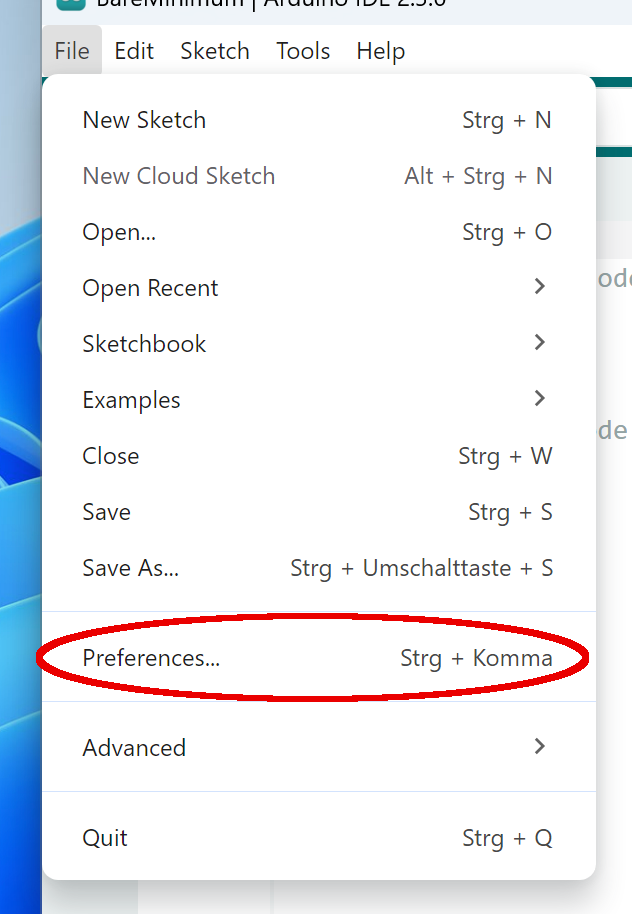
Next you have to open the field Additional boards manager URLs.
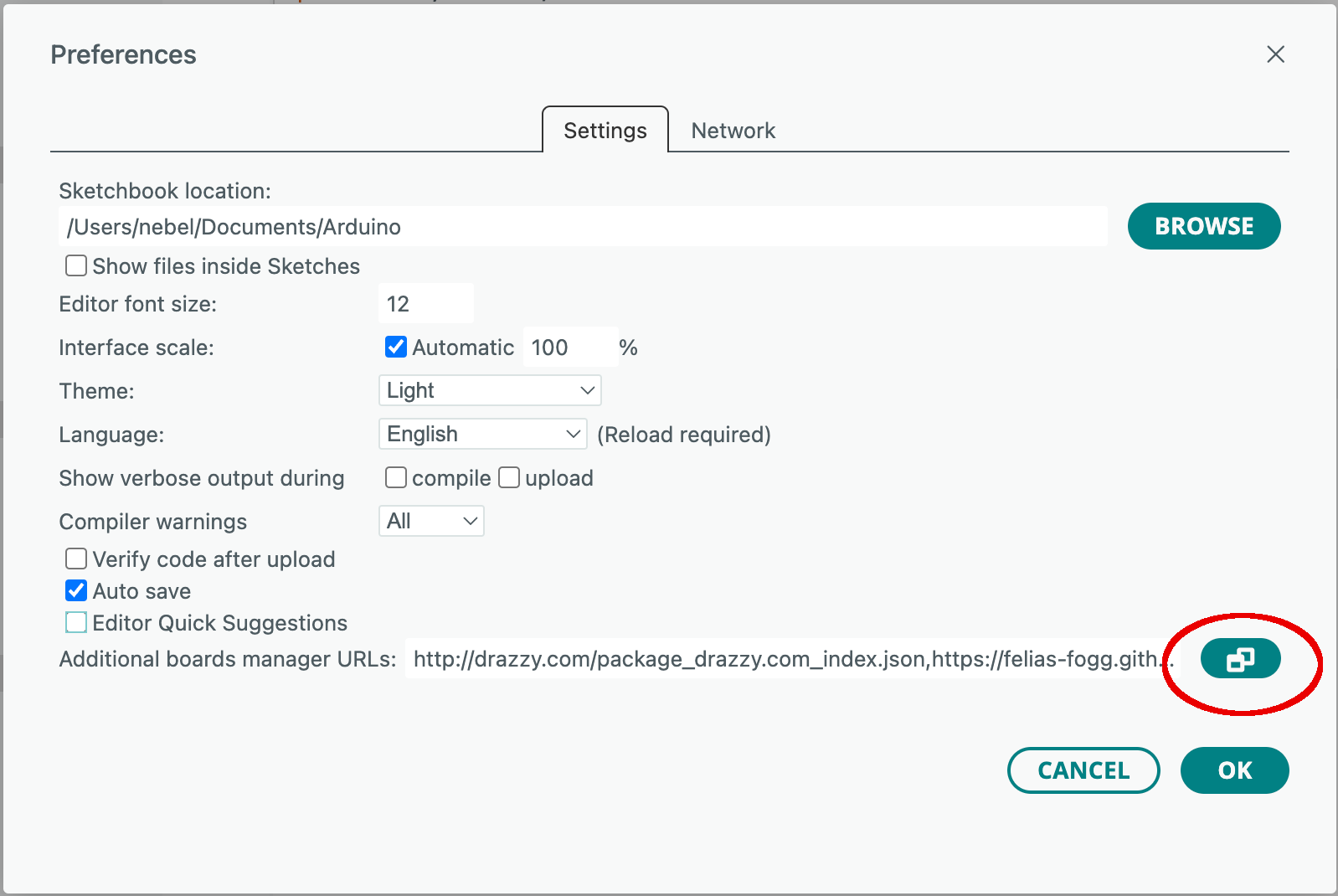
Now type in the package index URL.
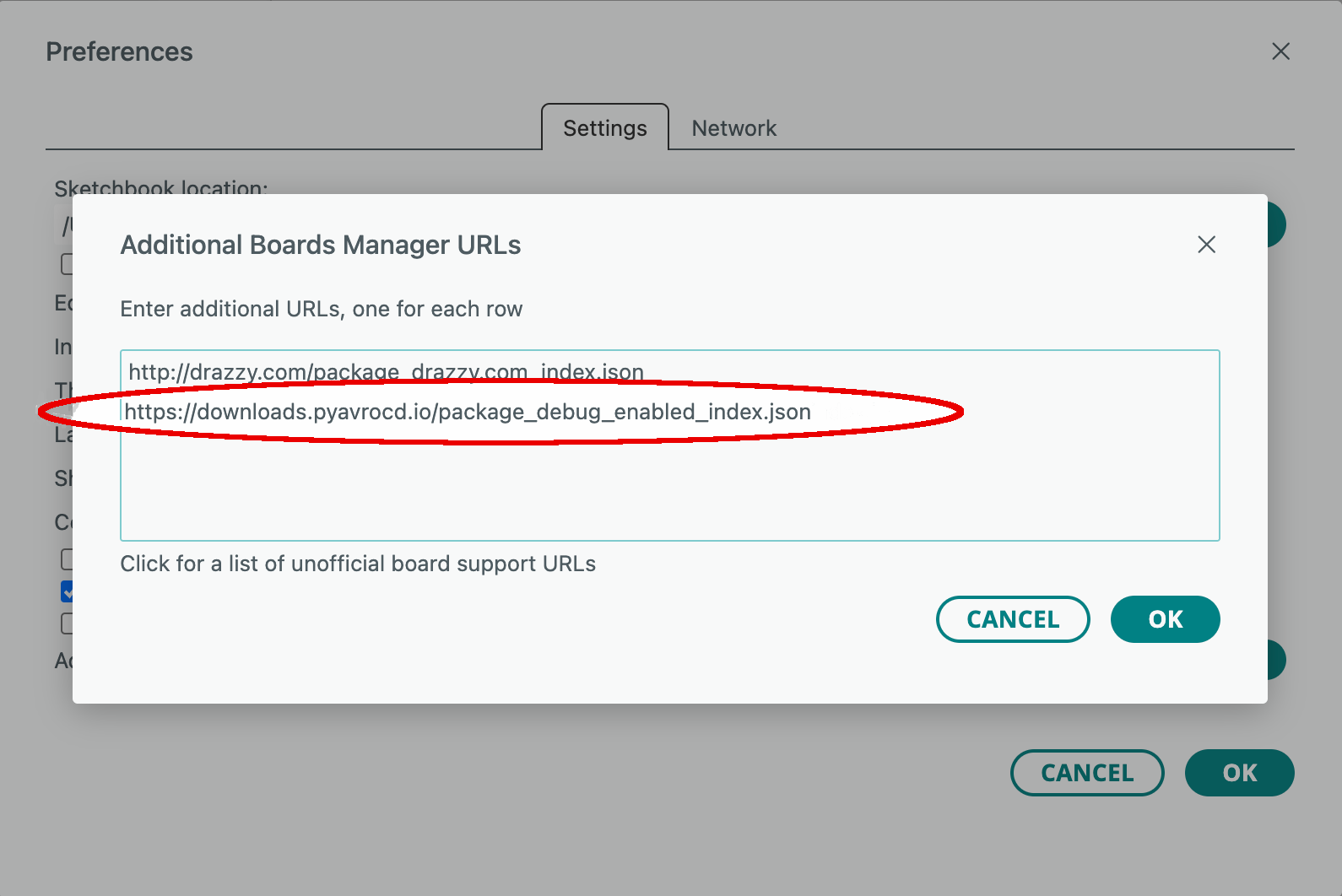
Finish the dialog by clicking on two OK buttons in succession.
Once this has been done, you can search in the Boards Manager for the package and install it or upgrade to the most recent version. In case of a debug-enabled fork, the version number is usually suffixed by -preX, and the name of the package will have (Debug enabled) attached to the official name.
How to install a new Arduino package or update an existing one
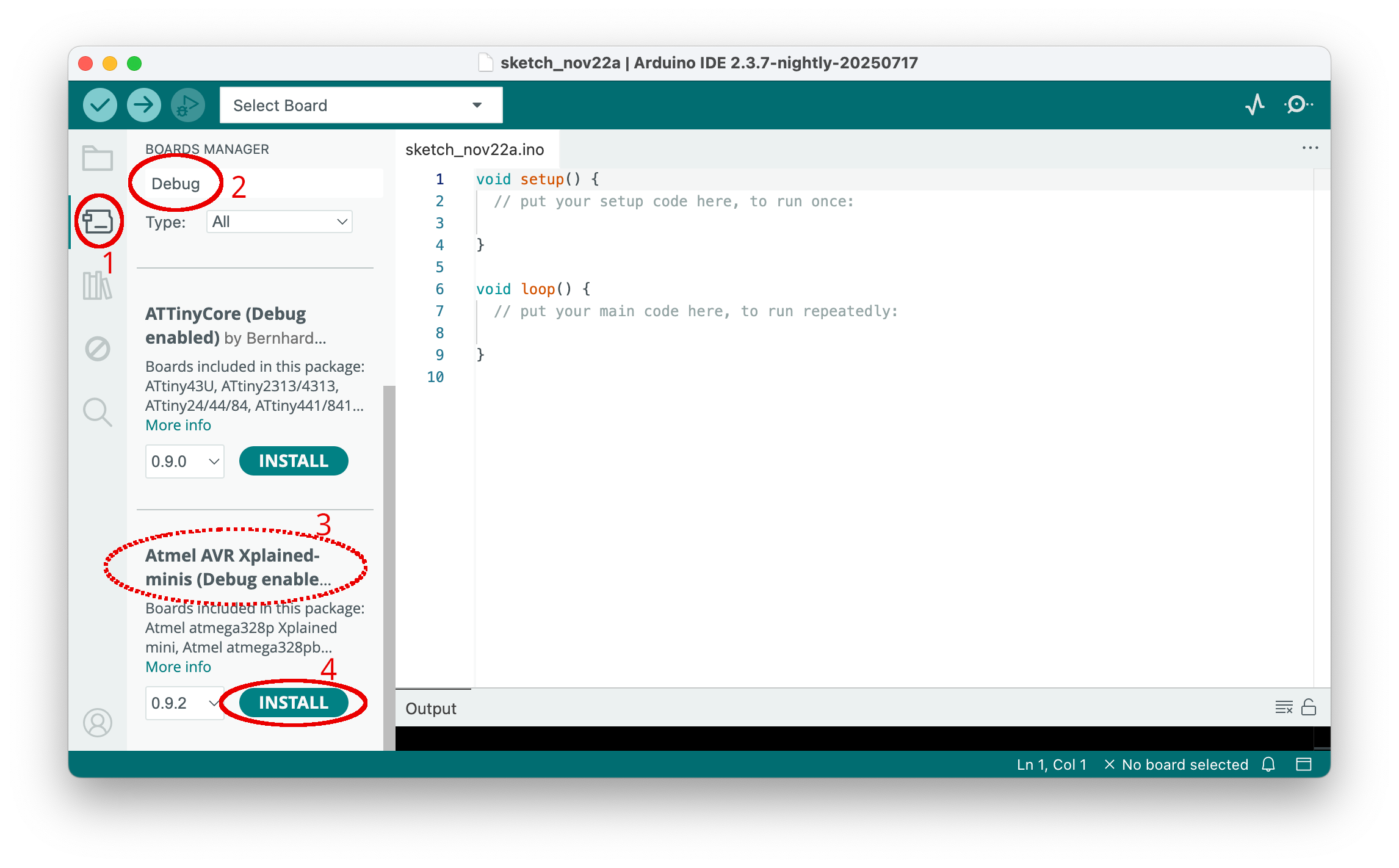
You need to activate the Boards Manager by clicking on the board symbol in the left side bar (1). After the boards manager pane has been opened, type part of the package's name into the search line (2). Then all packages with the search word in their description are displayed. Scroll down until you see the one you want to install (3). Install this package by clicking on Install (4). If the package is already installed, then an Update button will be shown that you need to click on.
Hardware packages with integrated debugging solutions
TinyCore
This is a fork of ATTinyCore version 2.0.0. It is the preferred way of supporting classic ATtinys. It does not yet support the micronucleus bootloaders, however. Debugging support has been integrated starting with the release of v0.0.1. You can install it after including the following URL:
https://mcudude.github.io/TinyCore/package_MCUdude_TinyCore_index.json
MicroCore
This is a package for the ATtiny13(A). Debugging support is integrated since version 2.5.0. You can make it installable by adding the following URL to the Boards Manager URLs:
https://mcudude.github.io/MicroCore/package_MCUdude_MicroCore_index.json
MiniCore
This is the package for the small ATmegas with a debugWIRE interface, aka, ATmegaX8. PyAvrOCD has been integrated into the package since version 3.1.0. You can make the package installable by adding the following boards manager URL:
https://mcudude.github.io/MiniCore/package_MCUdude_MiniCore_index.json
XMiniCore
This is a debug-enabled Arduino package for the Microchip development boards ATmega328P Xplained Mini, ATmega168BP Xplained Mini, and ATmega328PB Xplained Mini. It is meant to be a replacement for the Atmel AVR Xplained-minis board package of the official Arduino distribution. The new package is a stripped-down and adapted version of MiniCore. The boards, together with PyAvrOCD, work very smoothly (see quickstart guide for ATmega328P Xplained Mini). It is just plug-and-play. You can make the board package available by including the following boards manager URL:
https://felias-fogg.github.io/XMiniCore/package_felias-fogg_XMiniCore_index.json
MightyCore
An Arduino package for ATmega8535, ATmega16, ATmega32, ATmega164, ATmega324, ATmega644, and ATmega1284, whereby ATmega8535 does not have a debugging interface. Debugging is supported since version 3.1.0. You can make it installable by adding the following boards manager URL:
https://mcudude.github.io/MightyCore/package_MCUdude_MightyCore_index.json
MegaCore
A package for most 64- and 100-pin AVRs. For example, the Arduino Mega (2560) is supported by this package. All of the listed MCUs are debuggable, but the ATmega128 has the problem that only hardware breakpoints are allowed. Debugging is supported since version 3.1.0. You can make the package installable by adding the foolowing URL to the boards manager URL:
https://mcudude.github.io/MegaCore/package_MCUdude_MegaCore_index.json
MajorCore
This package covers just ATmega8515 and ATmega162, of which only the latter possesses a debugging interface. Debugging is supported since version 3.1.0. The additional boards manager URL is:
https://mcudude.github.io/MajorCore/package_MCUdude_MajorCore_index.json
MegaCoreX
This is a fork of the package for the megaAVR-0 chip family, such as the ATmega4809, which is used on the Nano Every Board and the Uno WiFi Rev 2. You can make the debug-enabled fork of the package available using the following URL:
https://mcudude.github.io/MegaCoreX/package_MCUdude_MegaCoreX_index.json
Debug-enabled forks of official Arduino packages
Arduino AVR Boards (Debug enabled)
This is the debug-enabled fork of the standard Arduino package, which supports all Arduino AVR boards. The only changes are
- additional programmers,
- changes to platform.txt to enable debugging,
- changes to boards.txt to enable the JTAG pins on boards with the JTAG interface, and
- an upgrade to version 8.0 of avrdude.
You can make this fork available by including:
https://felias-fogg.github.io/ArduinoCore-avr/package_felias-fogg_ArduinoCore-avr_index.json
Arduino megaAVR Boards (Debug enabled)
This is the debug-enabled fork of the megaAVR Arduino package, which supports the Nano Every as well as the Uno Wifi Rev2 boards. Note that these are also supported (offering more configuration options) by MegaCoreX. The only changes to the upstream repo are:
- additional programmers,
- changes to platform.txt to enable debugging,
- change to boards.txt to set the default programmer for the Uno Wifi Rev2, and
- an upgrade to version 8.0 of avrdude.
You can make this fork available by including:
https://felias-fogg.github.io/ArduinoCore-megaavr/package_felias-fogg_ArduinoCore-megaavr_index.json
Debug-enabled forks of 3rd-party packages
megaTinyCore (Debug enabled)
This is a fork of the package for modern ATiny Chips (series 0, 1, and 2). Make the debug-enabled fork available using the following URL:
https://felias-fogg.github.io/megaTinyCore/package_SpenceKonde_megaTinyCore_index.json
DxCore (Debug enabled)
This is a fork of DxCore, the package for the most recently marketed AVR chips. Make the debug-enabled fork available by using:
https://felias-fogg.github.io/megaTinyCore/package_SpenceKonde_DxCore_index.json
ATTinyCore (Debug enabled)
This is a debug-enabled fork of ATTinyCore version 1.5.2, which covers all classic ATtinys with a debugWire interface. Nowadays, TinyCore (see above) is the preferred package for classic ATtinys. You can make this fork available by including the following URL:
https://felias-fogg.github.io/ATTinyCore/package_drazzy.com_ATTinyCore_index.json