Setting the right fuses to enable debugging
The good news for Arduino IDE 2 users: You do not have to worry about fuses. All the fuse setting details are taken care of by the IDE.
One thing you have to be aware of is that it may be necessary to enable the JTAG pins on targets with the JTAG interface. This is done by choosing JTAG pins: JTAG enabled in the Tools menu, followed by the Burn Bootloader action using an SPI programmer (because the JTAG pins are not yet active!).
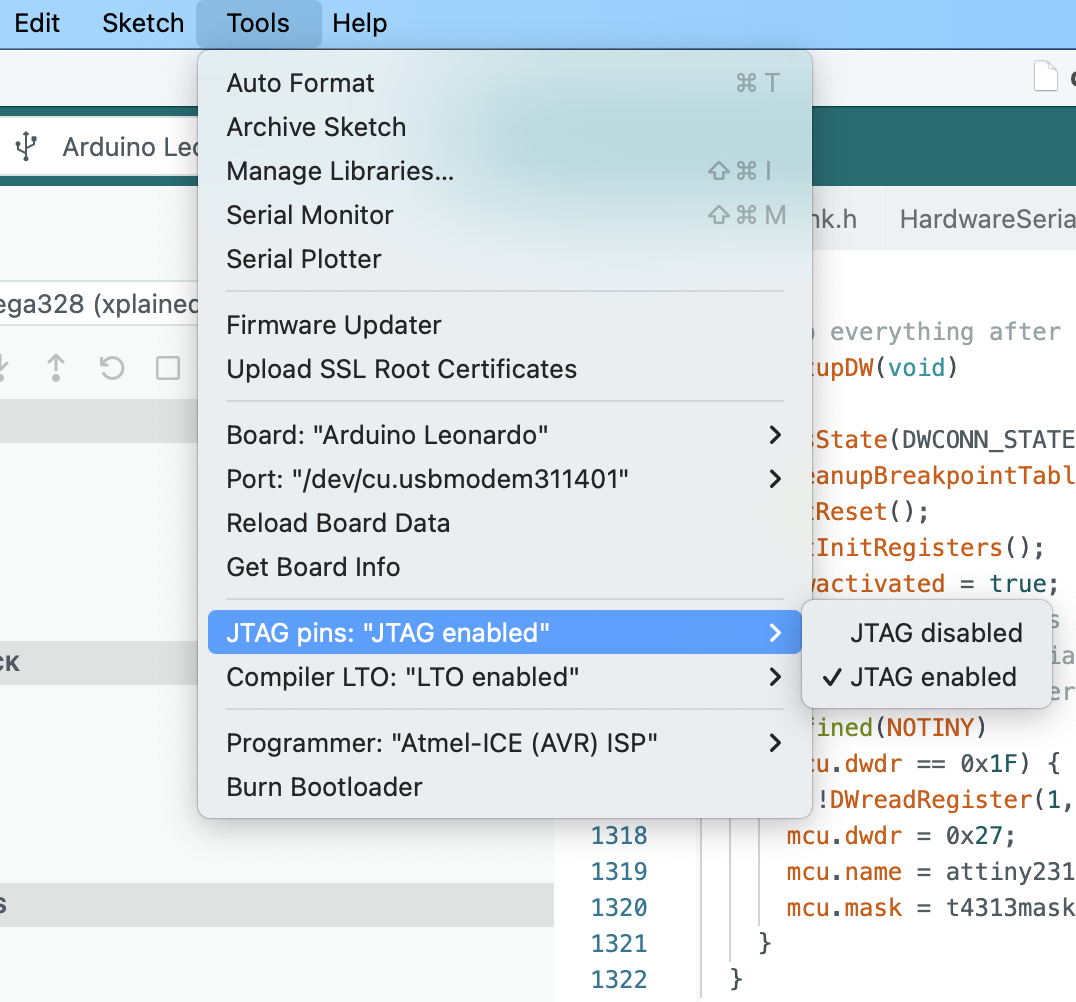
When you are done with debugging, you may want to re-enable the original functionality, which means that you should employ the Burn Bootloader action---with JTAG disabled, if it is a JTAG target. When you are dealing with a debugWIRE target, you have to remember to type the line monitor debugwire disable into the Debug Console before you terminate the debugger. And then you can also use the Burn Bootloader action.
And this is all you have to know when you use the Arduino IDE 2. In general, the story is a bit more complex, however.
General considerations
Sometimes it may be necessary to change a few fuses before debugging is possible. Some of the fuses will be taken care of by the GDB server, provided PyAvrOCD is asked to manage these fuses by a command line option, e.g., --manage all, when invoking the GDB server. One can also specify individually which resources to manage. There are the following resources:
Lockbits: If lockbits are set, then debugging is impossible. For this reason, the GDB server will clear the lockbits by erasing the chip's flash and EEPROM memory, provided PyAvrOCD has been instructed to manage the lockbits by--manage allor--manage lockbits.BOOTRST: If this fuse is programmed, then instead of starting at address 0x0000, the MCU will start execution at the bootloader address. Since this is usually not intended when debugging, the GDB server unprograms this fuse. For the unlikely case that one wants to debug a bootloader, there is still the option to protect this fuse by not includingbootrstas a fuse to be managed by the server when starting the GDB server from the command line.DWEN: This fuse needs to be programmed to access the debugWIRE on-chip debugger module. PyAvrOCD will program this fuse when asked to do so by the commandmonitor debugwire enable. After the fuse has been programmed, you must power-cycle the target board to enable the debugWIRE interface. Note that afterwards, SPI programming is impossible. With the commandmonitor debugwire disable, the debugWIRE interface will be disabled, and theDWENfuse will be unprogrammed. Of course, DWEN programming by PyAvrOCD is only performed if PyAvrOCD is instructed to manage this fuse.OCDEN: This is the fuse for enabling the JTAG on-chip debugger. It is simpler to deal with thanDWEN, because one can enable and disable this fuse in every situation. It will be activated before debugging starts and deactivated afterwards. This happens, of course, only if PyAvrOCD has been instructed to manage this fuse.EESAVE: If this fuse is programmed, then EEPROM contents will survive chip erase operations. If not, EEPROM content is deleted each time an erase operation is performed, even if this is only organizational. If you want to protect your EEPROM content, allow PyAvrOCD to manage this fuse. It will then temporarily program this fuse when necessary in order to safeguard the EEPROM content. This is particularly important when loading an executable that contains a code part to be stored in EEPROM. However, it does not help you when you need to clear the lock bits. If any lock bits are set, it is not possible to change fuses, which means you cannot change the EESAVE fuse temporarily.
If you want to leave all the fuse management to PyAvrOCD, then specify --manage all, which is the default with Arduino IDE2. If you want to play it safe, you can instead manage these fuses and the lockbits manually using a fuse setting program such as avrdude. Note that changing the set of managed fuses from one invocation to the next will affect debugWIRE targets only when the target is not in debugWIRE mode.
Finally, as already mentioned above, bootloaders will be deleted, so they need to be reinstalled after debugging has finished. Additionally, one cannot use the services some bootloaders offer, e.g., writing to flash memory. If you want to debug such a program, you need to set up a mock object, or you have to make sure that not the entire flash is erased by using the monitor command monitor erasebeforeload disable.
Preparing a debugWIRE target
Fuse settings when PyAvrOCD manages the fuse
In almost all cases, you do not need to change any fuses on a debugWIRE target before you can start debugging. One exception is when the RESET pin has been disabled (by programming the RSTDSBL fuse), allowing it to be used as a GPIO. In this case, you need to unprogram this fuse using high-voltage programming. The same holds when SPIEN (enabling SPI programming) is unprogrammed.
The DWEN and BOOTRST fuses and the lockbits will be taken care of by PyAvrOCD, if this is permitted (see above). EESAVE is not managed because the only situation where a chip erase can happen is when you clear the lockbits. And in this situation, EESAVE cannot be activated.
Fuse settings when fuses are managed manually
When you want complete control over the fuses, then make sure that the fuses are set as follows before you invoke the debugger:
-
If
lockbitsare set, clear them by erasing the entire chip. This is necessary because otherwise, debugging is impossible. This operation will erase any bootloader as well. -
Unprogram the
BOOTRSTfuse, if present and programmed. Otherwise, execution will not start at address 0x0000, but in the bootloader area that has been cleared. -
Program the
DWENfuse. After that, power-cycle the target board, which will bring the chip into debugWIRE mode.
Now, you should be able to connect to the OCD on the target MCU.
After you have finished debugging and issued the monitor debugwire disable command, you can connect again with an SPI programmer and unprogram the DWEN fuse. Make sure that, in between, power is always applied to the target board because otherwise you may have switched back to debugWIRE mode.
Preparing a JTAG target
Fuse settings when PyAvrOCD manages fuses
Access to the JTAG pins could be disabled. This is, for example, the case for the Arduino boards. In this case, you need to program the JTAGEN fuse before debugging can start. This has to be done using the SPI programming interface. From then on, you can connect to the board using the JTAG connector.
As in the debugWIRE case, it could be that SPI programming has been disabled. If the JTAG pins are enabled, this does not matter because the JTAG pins are all that is needed. If not, high-voltage programming is necessary.
The OCDEN, BOOTRST, and EESAVE fuses and the lockbits will be taken care of by PyAvrOCD.
Fuse settings when fuses are managed manually
When you want complete control over the fuses, make sure that the fuses are set as follows before you invoke the debugger. Make sure that the JTAG pins are enabled. Afterward, use avrdude and a JTAG programmer as follows:
- If
lockbitsare set, clear them by erasing the entire chip. This is necessary because otherwise, debugging is impossible. This will erase any bootloader as well. -
Unprogram the
BOOTRSTfuse, if programmed. Otherwise, execution will not start at address 0x000, but in the bootloader area that has been cleared. -
Program the
OCDENfuse.
Now, you should be able to connect to the OCD on the target MCU.
After you have finished debugging, you should unprogram OCDEN because otherwise no lower-power operation is possible.