Debug-capable Arduino packages
Arduino packages are the key to making debugging available in the Arduino IDE 2 and the Arduino Maker Workshop. You can distinguish them along two dimensions. The first one is the dimension of who maintains the debug-capable package. Some of them are original packages, maintained by their authors. Others are forks of existing packages. The second dimension is how much debug support is integrated into the package. Some are debug-configured, meaning that all configuration files have been provided, but the binary debugging tools are missing. For those packages, it is necessary to additionally install the AvrDebugger board package. A package is called debug-ready when it contains all the configuration files as well as the binary tools.
Up until version 1.7.0, all debug-capable packages had been debug-ready. Starting with 2.0.0, new versions of debug-capable packages are set up to be debug-configured. The main reasons behind this are that it saves considerable disk space and it allows for centralized updates of the debugging tools.
If you want to install such a debug-capable package, you first have to add new boards manager URLs in the Preferences dialog.
How to enter a new boards manager URL
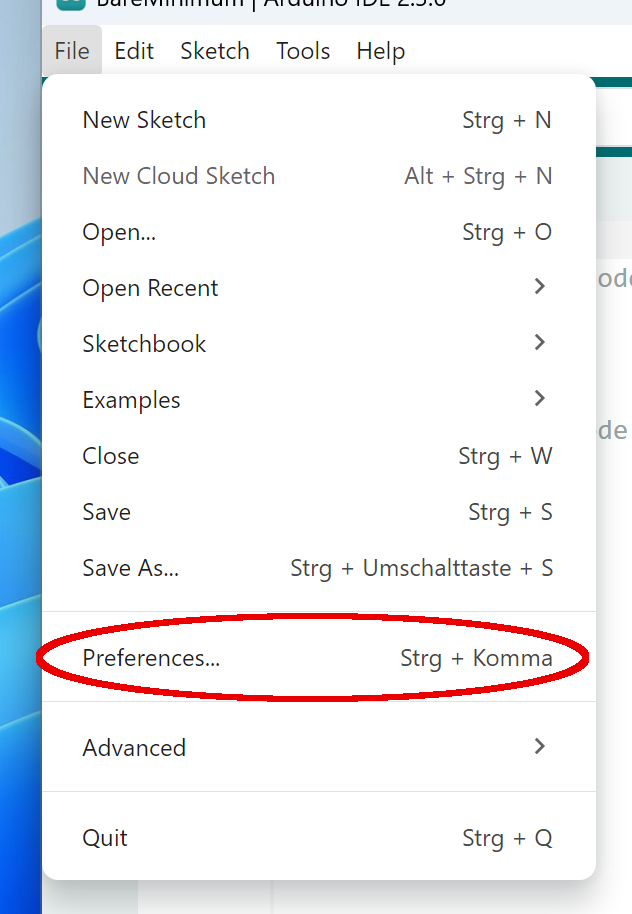
First you need to open the Preferences dialog, which you find either in the Arduino IDE or the File menu.
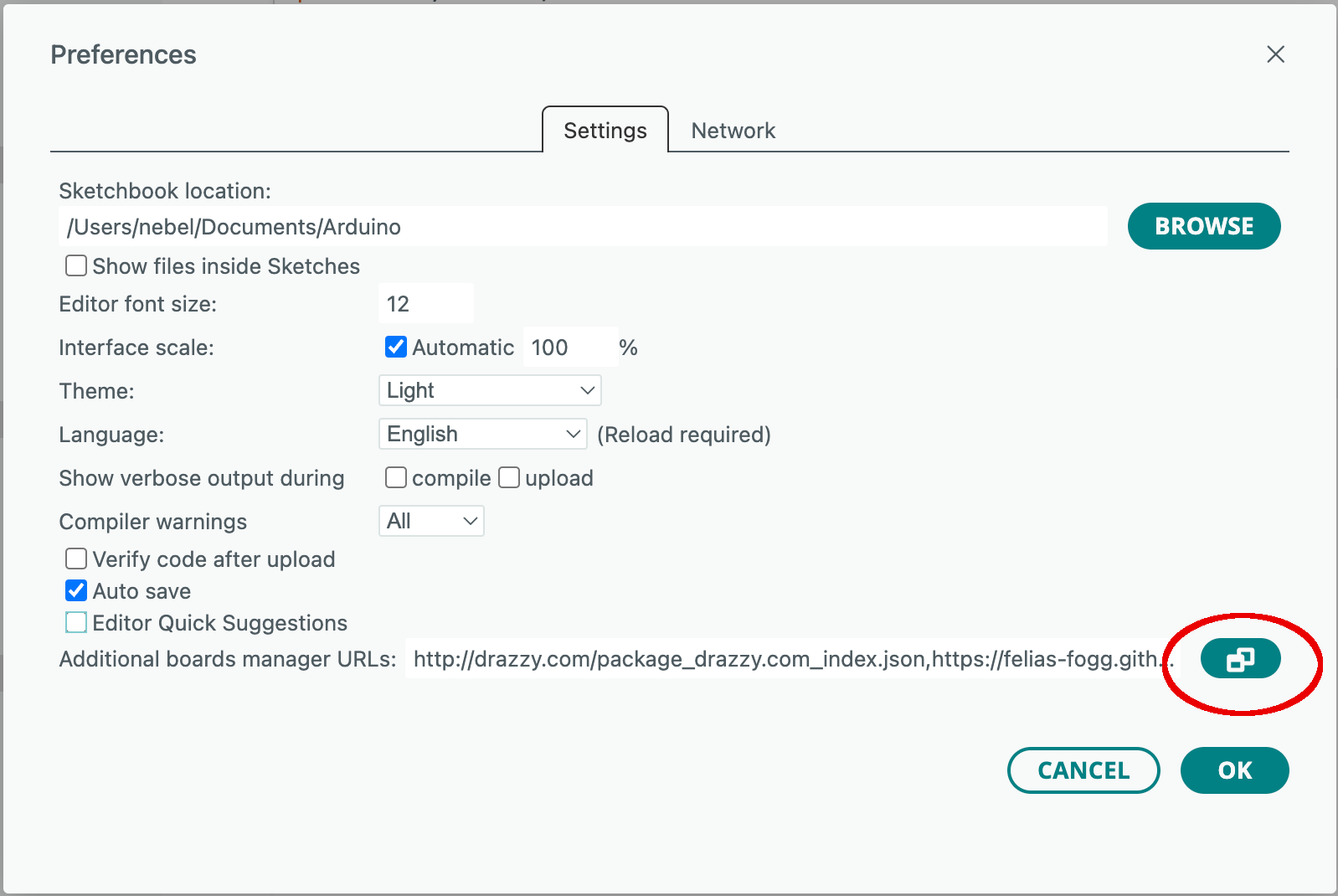
Next you have to open the field Additional boards manager URLs.
Now type in the package index URL.
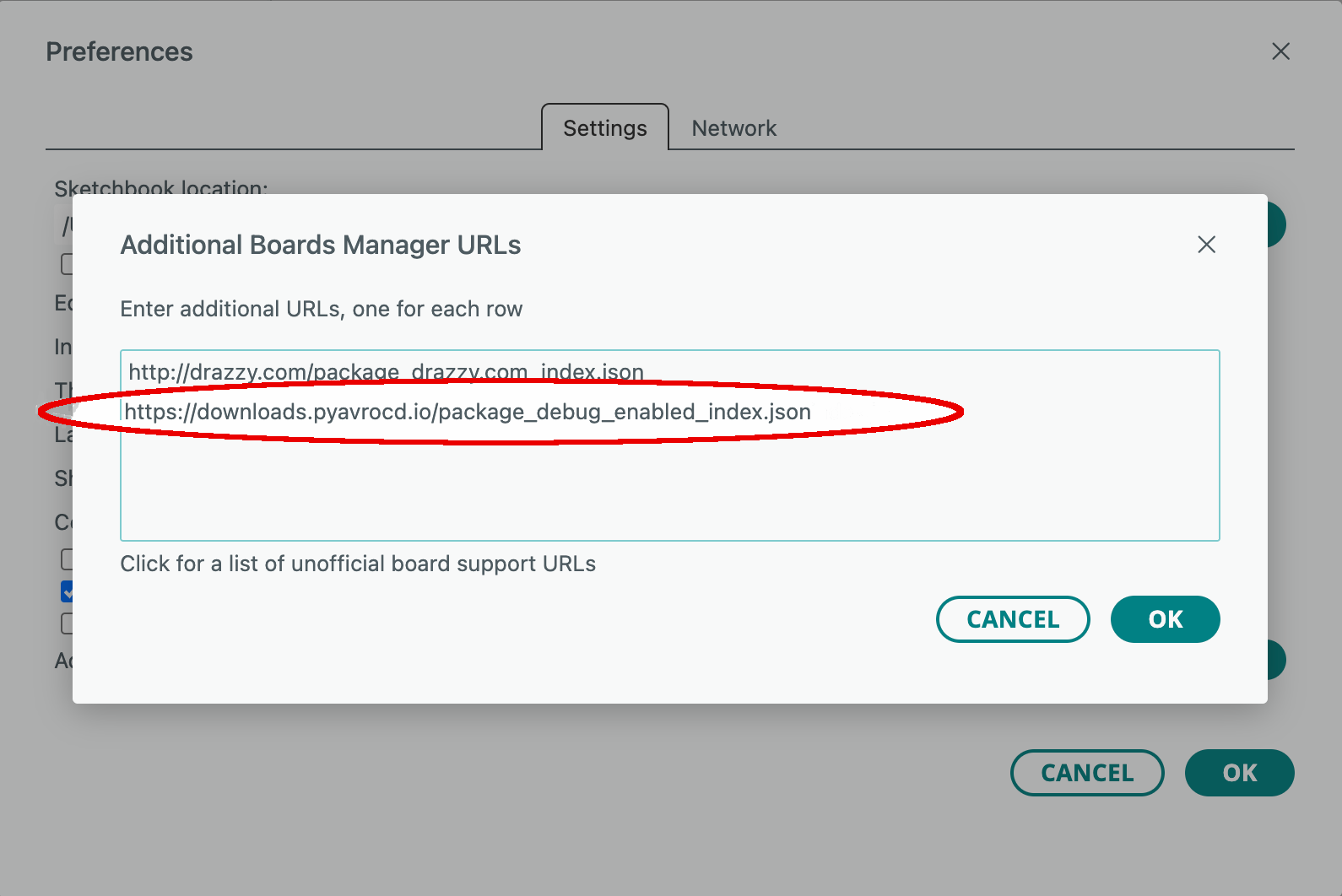
Finish the dialog by clicking on two OK buttons in succession.
Once this has been done, you can search in the Boards Manager for the packages and install or upgrade to the most recent version. In case of a debug-capable fork, the version number is usually suffixed by -preX, and the name of the package will have (debug-configured) attached to the official name (up to version 1.7.0, it used to be (Debug enabled)).
How to install a new Arduino package or update an existing one
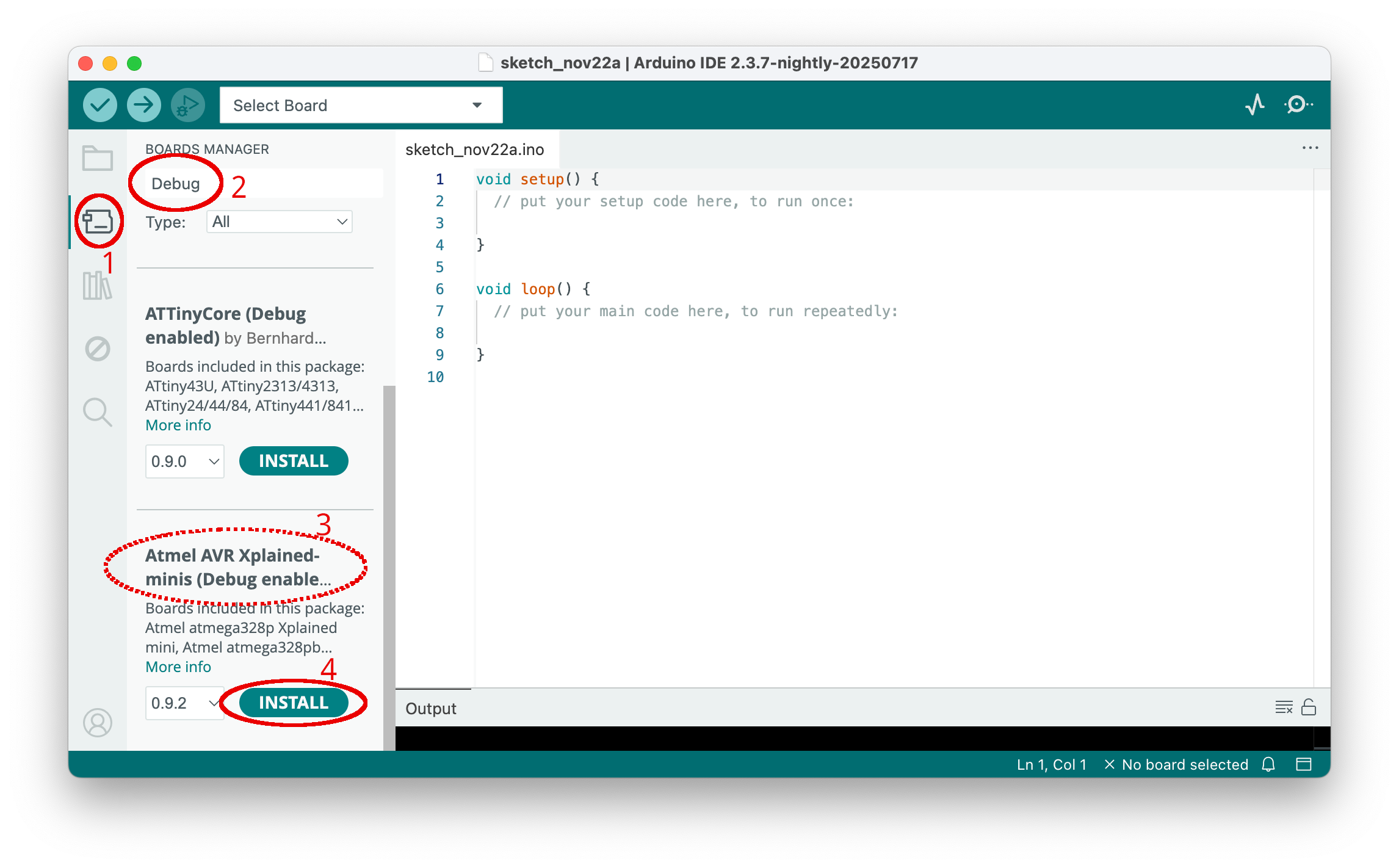
You need to activate the Boards Manager by clicking on the board symbol in the left side bar (1). After the boards manager pane has been opened, type part of the package's name into the search line (2). Then all packages with the search word in their description are displayed. Scroll down until you see the one you want to install (3). Install this package by clicking on Install (4). If the package is already installed, then an Update button will be shown that you need to click on.
Debug-ready packages
AvrDebugger
This is a package that inherits most of its properties from Arduino's AVR Board package. The main difference is that it provides more programmers and has the configurations set up to start a debugger on a limited set of the classic Arduino boards. Most importantly, it provides the debugging tools PyAvrOCD, a patched version of avr-gdb, and simavr. The plan is to make AvrDebugger the central package for supplying the debugging tools. That means that the other packages mentioned in this section are supposed to slowly migrate to the section on debug-configured packages. The necessary URL for the Additional Boards Managers URLs is:
https://felias-fogg.github.io/AvrDebugger/package_felias-fogg_AvrDebugger_index.json
megaAvrDebugger
This is the second platform of the AvrDebugger package and is installed from the same URL. It inherits core and variants from Arduino's megaAVR Boards package and adds the debug configuration and the UPDI programmers for the Nano Every and the Uno WiFi Rev2. It uses the same debugging tools as AvrDebugger; if you install both, the tools are installed only once. The Uno WiFi Rev2 has an onboard debugger (mEDBG); the Nano Every needs an external UPDI probe connected to the UPDI pad on the back of the board.
TinyCore
This is a fork of ATTinyCore version 2.0.0. It is the preferred way of supporting classic ATtinys. It does not yet support the micronucleus bootloaders, however. Debugging support has been integrated starting with the release of v0.0.1. You can install it after including the following URL:
https://mcudude.github.io/TinyCore/package_MCUdude_TinyCore_index.json
MicroCore
This is a package for the ATtiny13(A). Debugging support is integrated since version 2.5.0. You can make it installable by adding the following URL to the Boards Manager URLs:
https://mcudude.github.io/MicroCore/package_MCUdude_MicroCore_index.json
MiniCore
This is the package for the small ATmegas with a debugWIRE interface, aka, ATmegaX8. PyAvrOCD has been integrated into the package since version 3.1.0. You can make the package installable by adding the following boards manager URL:
https://mcudude.github.io/MiniCore/package_MCUdude_MiniCore_index.json
MightyCore
An Arduino package for ATmega8535, ATmega16, ATmega32, ATmega164, ATmega324, ATmega644, and ATmega1284, whereby ATmega8535 does not have a debugging interface. Debugging is supported since version 3.1.0. You can make it installable by adding the following boards manager URL:
https://mcudude.github.io/MightyCore/package_MCUdude_MightyCore_index.json
MegaCore
A package for most 64- and 100-pin AVRs. For example, the Arduino Mega (2560) is supported by this package. All of the listed MCUs are debuggable, but the ATmega128 has the problem that only hardware breakpoints are allowed. Debugging is supported since version 3.1.0. You can make the package installable by adding the following URL to the boards manager URL:
https://mcudude.github.io/MegaCore/package_MCUdude_MegaCore_index.json
MajorCore
This package covers just ATmega8515 and ATmega162, of which only the latter possesses a debugging interface. Debugging is supported since version 3.1.0. The additional boards manager URL is:
https://mcudude.github.io/MajorCore/package_MCUdude_MajorCore_index.json
MegaCoreX
This package covers the megaAVR-0 chip family, such as the ATmega4809, which is used on the Nano Every Board and the Uno WiFi Rev 2. You can make it available using the following URL:
https://mcudude.github.io/MegaCoreX/package_MCUdude_MegaCoreX_index.json
Debug-configured packages
XMiniCore
This is a debug-configured Arduino package for the Microchip development boards ATmega328P Xplained Mini, ATmega168BP Xplained Mini, and ATmega328PB Xplained Mini. It is meant to be a replacement for the Atmel AVR Xplained-minis board package of the official Arduino distribution. The new package is a stripped-down and adapted version of MiniCore. The boards, together with PyAvrOCD, work very smoothly (see quickstart guide for ATmega328P Xplained Mini). It is just plug-and-play. You can make the board package available by including the following boards manager URL:
https://felias-fogg.github.io/XMiniCore/package_felias-fogg_XMiniCore_index.json
As with all the other packages in this section, you also need to install the AvrDebugger package.
Debug-configured forks
ATTinyCore (debug-configured)
This is a fork of ATTinyCore version 1.5.2, which covers all classic ATtinys with a debugWIRE interface. Nowadays, TinyCore (see above) is the preferred package for classic ATtinys. However, I still maintain ATTinyCore 1.5.2 so that people can use it if they want. You can make this fork available by including the following URL:
https://felias-fogg.github.io/ATTinyCore/package_drazzy.com_ATTinyCore_index.json
If you want to debug with this core, you need to install the AvrDebugger package as well.
megaTinyCore (debug-configured)
This is a fork of the package for modern ATiny Chips (series 0, 1, and 2). Make this debug-configured fork available using the following URL:
https://felias-fogg.github.io/megaTinyCore/package_SpenceKonde_megaTinyCore_index.json
And again, if you want to debug, you need to install the AvrDebugger package too.
DxCore (debug-configured)
This is a fork of DxCore, the package for the most recently marketed AVR chips. Make the debug-capable fork available by using:
https://felias-fogg.github.io/DxCore/package_SpenceKonde_DxCore_index.json
As before, debugging is only possible if you install the AvrDebugger package.
Retired forks
Some forks that I provided earlier are now in a retired state. They are marked as deprecated and their README pages tell you what to install instead.
Arduino AVR Boards (Debug enabled)
This fork of the standard Arduino package is deprecated. Debugging the classic Arduino AVR boards is now provided by AvrDebugger, which works together with the official Arduino AVR Boards. If you have installed the fork, switch over as follows:
- Remove
https://felias-fogg.github.io/ArduinoCore-avr/package_felias-fogg_ArduinoCore-avr_index.jsonfrom the boards manager URLs. - In the
Boards Manager, select a 1.8.x version of Arduino AVR Boards and install it. This replaces the fork. - Install AvrDebugger.
Arduino megaAVR Boards (Debug enabled)
This is a fork of the megaAVR Arduino package, which supports the Nano Every as well as the Uno WiFi Rev2 boards. Debugging the Arduino megaAVR boards is now provided by megaAvrDebugger, which works together with the official Arduino megaAVR Boards. If you have installed the fork, switch over as follows:
- Remove
https://felias-fogg.github.io/ArduinoCore-megaavr/package_felias-fogg_ArduinoCore-megaavr_index.jsonfrom the boards manager URLs. - In the
Boards Manager, select a 1.8.x version of Arduino megaAVR Boards and install it. This replaces the fork. - Install megaAvrDebugger.